How to find your best time to post on social media (using your own data)
Generic “best times to post” charts are averages of other people’s audiences. Here’s a simple two-week test to find the times that work for yours.
5 minute read

Software engineer and SaaS founder
In this article
- Why timing matters (and why it matters less than you think)
- Step 1: Start with when your audience is online
- Step 2: Pick 3 slots to test
- Step 3: Run the test for two weeks
- Step 4: Compare engagement per post, not totals
- Step 5: Update your schedule, then test again later
- Common mistakes to avoid
- Common questions
- Let your queue do the testing
Search for “best time to post on Instagram” and you’ll find a dozen charts that all disagree. Tuesday at 11. Wednesday at 9. Weekends. Never weekends.
They disagree because they’re averages of millions of other people’s audiences. Yours is probably different. A bakery’s followers, a B2B founder’s followers and a gaming creator’s followers are awake, bored and scrolling at very different times.
The good news: finding your best times doesn’t need a data team. It needs two weeks and a little curiosity.
In short: start with when your followers are online, test a few time slots for two weeks, compare engagement per post, keep the winners and test again every couple of months.
Why timing matters (and why it matters less than you think)#
Posting when your audience is around gives each post a better chance in the first hour, which is when most networks decide whether to show it to more people.
But timing is a multiplier, not a magic trick. A great post at an average time will beat an average post at the perfect time. So get the basics right first: a regular rhythm, a strong first line, and the right format for each network. Then tune the timing.
Step 1: Start with when your audience is online#
Most networks show you when your followers are active, inside their own app:
- Instagram and Facebook show follower activity by day and hour in their insights.
- TikTok shows follower activity in its analytics for many accounts.
- YouTube shows when your viewers are on YouTube in YouTube Studio.
- LinkedIn, X, Threads, Bluesky and Mastodon offer less here, so you’ll lean more on testing.
Write down the two or three busiest windows for each network. These are your starting candidates.
Also think about your audience’s day. Office workers check LinkedIn before work and at lunch. Parents scroll after bedtime. Students are online late. Common sense is a perfectly good starting point.
Step 2: Pick 3 slots to test#
For each network, pick three slots to compare. For example, for LinkedIn:
| Slot | Day and time |
|---|---|
| A | Tuesday and Thursday, 8:00 am |
| B | Tuesday and Thursday, 12:30 pm |
| C | Tuesday and Thursday, 5:30 pm |
Keep everything else as steady as you can. Similar types of posts, similar length, the same days. You’re trying to change one thing: the time.
Step 3: Run the test for two weeks#
The easiest way to run a fair test is with a posting queue. In PostGic:
- Set your posting schedule with the slots you want to test.
- Write your posts as usual and add them to the queue.
- Each post fills the next free slot, so your test runs itself.
All times are shown in your workspace timezone, so the test stays accurate even if you travel. If you haven’t set up a queue before, our guide to scheduling social media posts shows how.
Two weeks gives you a handful of posts per slot. That’s not a scientific study, but it’s enough to spot a clear winner or rule out a clear loser.
Step 4: Compare engagement per post, not totals#
At the end of the two weeks, open your analytics. In PostGic, choose a channel and the date range of your test. You’ll see followers, impressions, engagements and engagement rate, each compared with the previous period, plus your top posts.
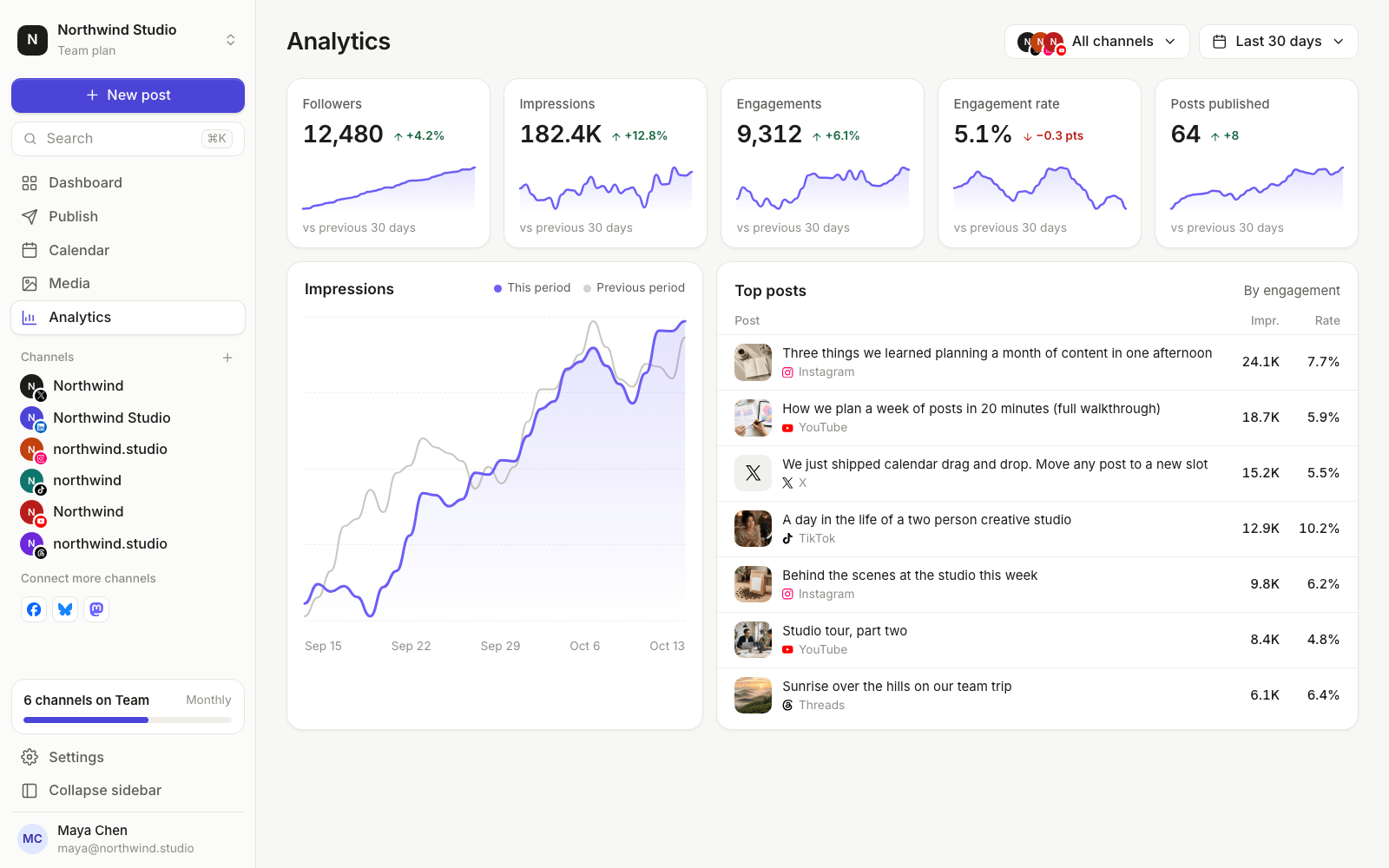
When you compare slots, look at engagement rate or engagements per post, not totals. One slot might have more total engagements just because it had more posts.
A quick way to read the results:
- One slot clearly wins: keep it, and test a new challenger against it next time.
- No clear difference: great news. Timing matters less for your audience, so pick whatever’s easiest for you.
- Results are all over the place: the content is probably varying more than the time. Run the test again with more similar posts.
A note on LinkedIn: PostGic’s Analytics rely on the metrics each platform’s API provides, and LinkedIn isn’t included. Use LinkedIn’s own post analytics for that part of the test. We cover LinkedIn in more detail in how to schedule LinkedIn posts.
Step 5: Update your schedule, then test again later#
Move your posting schedule to the winning slots. Because the queue drops each new post into the next free slot, you only change the times once and every future post follows.
Then put a reminder in your calendar to test again in two or three months. Audiences change with seasons, school terms and your own growth.
Common mistakes to avoid#
- Changing too many things at once. If you change the time and the format and the topic, you won’t know which one made the difference.
- Judging from one post. A single post can take off for reasons that have nothing to do with timing.
- Copying another account’s schedule. Their audience isn’t yours.
- Ignoring your own time zone. Schedule in the time zone where your audience lives, not where you happen to be.
Common questions#
Is there a single best time to post on social media?#
No. There are times that work well for your audience on each network. They’re usually different from one network to the next, which is why it’s worth testing each one separately.
How often should I re-test?#
Every two to three months is plenty, or whenever your audience changes, for example after a big jump in followers or a move into a new market.
Should I post at the same time every day?#
Consistency helps your audience know when to expect you, but it doesn’t need to be the exact same minute. Picking two or three regular windows and sticking to them works well.
Let your queue do the testing#
Set three test slots, fill your queue for two weeks, then check the results. It’s the simplest way to stop guessing.
You can try PostGic on the free plan, for up to 3 channels and with no credit card needed. Get started for free.
 Anuj Shashimal